


Blog
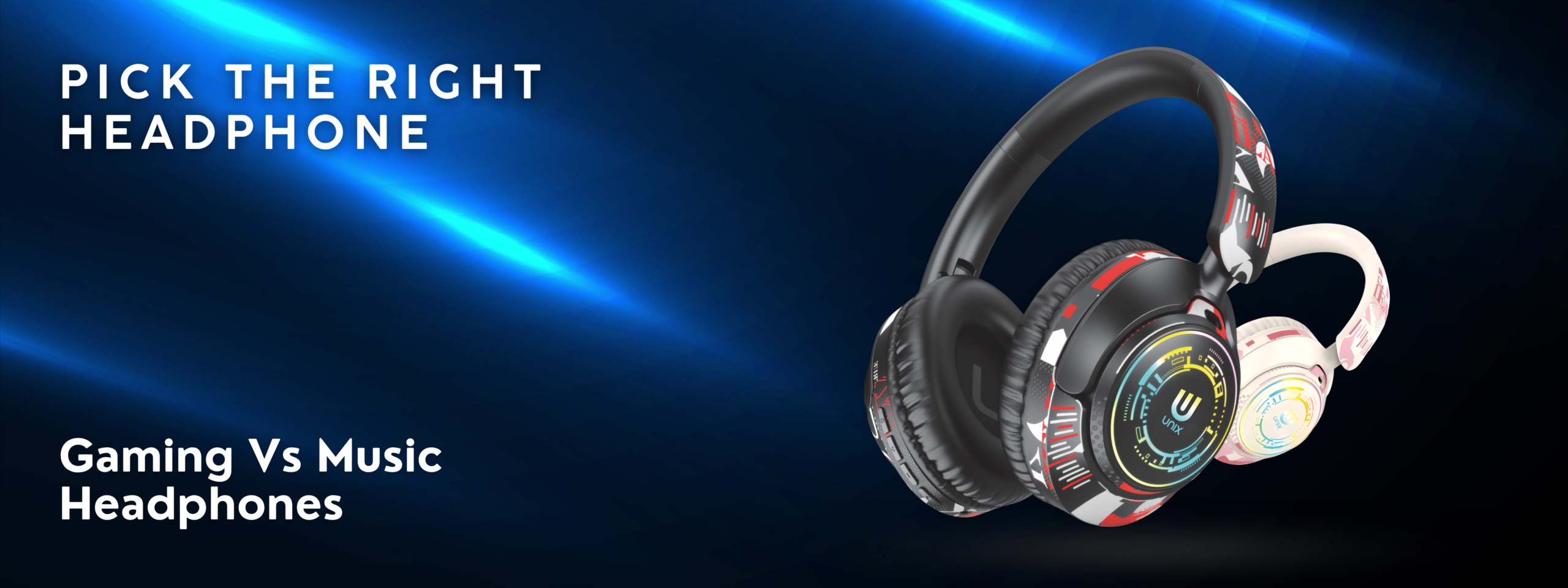
Gaming vs Music Headphones – Pick the Right One for Your Needs

Introduction
"Can I use gaming headphones for music?" "Are music headphones good for gaming?" These are the questions we hear most often at Unix India.
The short answer? Not always. While some headphones work well for both purposes, the best experience comes from choosing headphones tailored to your primary use case.
Gaming and music listening have different audio requirements, and the best headphones for one might be just okay for the other. In this guide, we'll break down exactly what makes a headphone suited for gaming versus music, help you understand your needs, and show you how to choose wisely.
The Key Differences: Gaming vs Music Headphones
Audio Characteristics
Gaming Headphones
Sound Signature: Bass-forward with boosted mids and highs
- Bass: Heavy emphasis (good for explosions, gunfire)
- Mids: Clear and present (good for voice dialogue)
- Treble: Crisp and detailed (good for positional audio cues)
- Soundstage: Wide (helps locate enemy positions)
Why it matters:
- Need to hear directional audio cues
- Explosions and gunfire require punchy bass
- Dialog and voice chat must be clear
- Footsteps and subtle sounds are critical
Music Headphones
Sound Signature: Genre-dependent (but usually balanced or warm)
- Bass: Controlled but deep (musical enjoyment)
- Mids: Smooth and warm (vocal clarity)
- Treble: Natural and extended (instrument detail)
- Soundstage: Balanced (accurate representation)
Why it matters:
- Need accurate reproduction of all instruments
- Vocal clarity is important
- Natural, non-fatiguing sound for long listening
- Every frequency should be heard as intended
Latency (Delay)
This is where gaming and music differ most significantly.
Gaming Latency Requirements:
- Ideal latency: 1–5ms (imperceptible delay)
- Acceptable latency: 5–15ms (barely noticeable)
- Poor latency: 20ms+ (visible lip-sync issues)
Popular gaming headphones support "low-latency modes" or "game modes" that use proprietary protocols to reduce this.
Music Listening Latency:
- Not important at all
- Latency doesn't matter when you're just listening
- Wireless headphones naturally have 30–100ms latency for music
- You don't notice because music isn't synced to video
Comfort for Extended Use
Gaming Sessions:
- Comfort for 4–8 hour sessions
- Padding quality is essential
- Lightweight design reduces neck strain
- Good ventilation (gamers wear headphones while active)
Music Listening:
- Comfort for 2–4 hour sessions on average
- Padding quality important but less critical
- Weight slightly less important
- Natural sound matters more than comfort
Microphone Quality
Gaming Headphones:
- Microphone is essential for team communication
- Need noise cancellation in microphone
- Should suppress keyboard and clicking sounds
- Clear voice transmission is critical
Music Headphones:
- Microphone is optional
- Many music-focused headphones skip mic entirely
- When included, mic quality is secondary concern
Driver Technology and Frequency Response
Gaming Headphones:
- Drivers tuned for gaming frequencies
- Often 40Hz–20,000Hz range (slight bass emphasis)
- Mid-heavy tuning for voice clarity
Music Headphones:
- Drivers tuned for musical accuracy
- 20Hz–20,000Hz range (full spectrum)
- Genre-specific tuning based on target audience
- More sophisticated driver systems
Type-by-Type Breakdown
Over-Ear Headphones
Best For: Both gaming and music (with caveats)
Gaming Advantages:
- Wide soundstage for positional audio
- Long comfort window for marathons
- Better microphone integration
- More immersive experience
Music Advantages:
- Superior sound quality potential
- Better passive noise isolation
- Comfortable for extended listening
- More driver options
Recommended Models:
- UNIX UX-W7 Major – Great all-rounder at ₹1,799
- UNIX UX-W3 Havana – Balanced for both uses at ₹1,699
- UNIX UX-800 Off Beat – Affordable with gaming capability at ₹1,499
Gaming-Specific Headphones
Best For: Competitive gaming, esports, multiplayer games
Key Features:
- 7.1 or 5.1 surround sound simulation
- Ultra-low latency (<5ms)
- Boom microphone with noise cancellation
- Optimized frequency response for gaming (boosted mids)
- RGB lighting (often included, not essential)
When to Choose:
- You play competitive multiplayer games
- Positional audio is important to you
- You value team communication
- You want hardware-level latency optimization
Downsides for Music:
- Boosted mids can make music sound artificial
- Bass emphasis is gaming-optimized, not musical
- Soundstage is artificial (not for music)
- Treble boost can sound harsh on vocals
Music-Focused Headphones
Best For: Audiophiles, musicians, critical listeners
Key Features:
- Accurate, neutral frequency response
- Premium drivers (40mm+)
- High-impedance drivers for better clarity
- Minimal coloration of sound
- Often no microphone to reduce weight
When to Choose:
- You're an audiophile or music enthusiast
- You want accurate sound reproduction
- You listen to classical, jazz, acoustic music
- You produce or work with music
Downsides for Gaming:
- May lack surround sound capability
- Neutral sound can feel plain for gaming
- No built-in microphone
- Soundstage may be too accurate (lacking gaming drama)
- Latency isn't optimized for gaming
Balanced Headphones (Best Hybrid Option)
Best For: Gaming AND music equally
Key Features:
- Neutral-to-warm sound signature
- Good but not exaggerated bass
- Clear mids and treble
- Decent soundstage
- Low-latency gaming mode
- Good quality microphone included
When to Choose:
- You want one headphone for everything
- You game casually (not competitively)
- You listen to music frequently
- You take calls and do video calls
- Budget is a consideration
Trade-offs:
- Not optimized for either gaming or music
- Won't match dedicated gaming headphones for esports
- Won't match audiophile headphones for music quality
- But solid in both areas
Recommended Models:
- UNIX UX-W7 Major – Professional tuning works for both
- UNIX UX-W3 Havana – Warm, balanced sound signature
Detailed Comparison: Gaming vs Music Audio Requirements
Call of Duty / FPS Gaming
Audio Critical For:
- Enemy footsteps (treble frequencies)
- Gun direction (soundstage and imaging)
- Grenade warnings (mids)
- Teammate communication (voice clarity)
Ideal Headphone:
- Boosted treble for footsteps
- Wide soundstage for direction
- Clear mids for voice
- Low latency for consistency
Gaming Headphones Win: ✅
Classical Music Listening
Audio Critical For:
- Violin clarity and detail (treble)
- Piano dynamics (full range)
- Orchestra separation (soundstage)
- Natural instrument tone (accurate tuning)
Ideal Headphone:
- Neutral, natural tuning
- Extended treble for detail
- Accurate soundstage for orchestra placement
- Premium drivers for fidelity
Music Headphones Win: ✅
Hip-Hop / Rap Music
Audio Critical For:
- Punchy bass (bass impact)
- Vocal clarity (mids)
- Beat tracking (low frequencies)
- Natural bass response
Ideal Headphone:
- Controlled but deep bass
- Clear, warm mids
- Punchy low-end
- Good dynamics
Good for: Both gaming and hip-hop headphones can work, but music headphones are better
League of Legends / MOBA Gaming
Audio Critical For:
- Ability sounds (mids and treble)
- Enemy proximity audio (soundstage)
- Announcer voice (voice clarity)
- Minimap sounds
Ideal Headphone:
- Clear mids and treble
- Decent soundstage
- Good voice clarity
- Low latency
Gaming Headphones Better: ✅ (but not critical)
Valorant / Tactical FPS
Audio Critical For:
- Footstep direction (treble + soundstage)
- Ability audio cues (all frequencies)
- Enemy team voice (voice clarity)
- Weapon fire direction
Ideal Headphone:
- Boosted treble for footsteps
- Wide soundstage
- Clear mids for communication
- Ultra-low latency (<5ms)
Gaming Headphones Win: ✅ (significantly)
Quick Decision Matrix
Use CaseBest ChoiceAlternativeCompetitive FPS (CS2, Valorant)Gaming HeadphonesProfessional Gaming HeadphoneCasual gaming + musicBalanced HeadphonesGaming HeadphonesAudiophile music listeningMusic HeadphonesNeutral HeadphonesWork + gaming + musicBalanced HeadphonesOver-ear all-purposeVideo editing/productionMusic/Studio HeadphonesBalanced HeadphonesCasual gamingMusic HeadphonesBalanced HeadphonesCompetitive esportsProfessional Gaming HeadphoneGaming HeadphonesSpecifications to Compare
When evaluating headphones, focus on these specs for your use case:
For Gaming
Critical Specs:
- ✅ Latency (1–5ms ideal)
- ✅ Surround sound capability
- ✅ Microphone quality (noise cancellation)
- ✅ Boom microphone (not integrated)
- ✅ Impedance (32 Ohms or lower)
Less Critical:
- Speaker drivers (40mm is fine)
- Frequency response (extended treble preferred)
- Build quality (comfortable more important)
For Music
Critical Specs:
- ✅ Frequency response (20Hz–20,000Hz)
- ✅ Driver quality and size (40mm+)
- ✅ Impedance (40 Ohm or higher = better)
- ✅ THD (Total Harmonic Distortion) – lower is better
- ✅ Soundstage and imaging
Less Critical:
- Microphone (often removed)
- Latency (doesn't matter)
- RGB lighting (purely aesthetic)
Can You Use Gaming Headphones for Music? (Honest Answer)
Yes, but…
Gaming headphones work for music because they still play audio. However:
- The boosted mids and treble can make music sound artificial
- Bass emphasis might not suit your genre
- Lack of subtle audio details noticeable to trained ears
- Generally comfortable for listening
Verdict: ✅ Works adequately, but music headphones are better
Can You Use Music Headphones for Gaming? (Honest Answer)
It depends on your gaming style:
Works Well For:
- ✅ Casual gaming
- ✅ Single-player games
- ✅ Story-driven games
- ✅ Games where audio isn't critical
Doesn't Work Well For:
- ❌ Competitive multiplayer
- ❌ Tactical FPS games
- ❌ Games requiring positional audio
- ❌ Esports/ranked play
The Main Problem: Missing the latency optimization and surround sound needed for competitive advantage
Verdict: ✅ Works for casual gaming, ❌ poor for competitive
How to Choose: A Decision Framework
Step 1: Identify Your Primary Use (80% of usage)
Am I going to use these headphones primarily for:
- [ ] Competitive gaming (pick Gaming)
- [ ] Music listening (pick Music)
- [ ] Equally both? (pick Balanced)
- [ ] Casual gaming + music (pick Balanced)
Step 2: Check Secondary Use (20% of usage)
What's my secondary use case?
- Primary: Gaming, Secondary: Music → Gaming headphones are fine
- Primary: Music, Secondary: Casual gaming → Music headphones work
- Primary: Both equally → Balanced headphones essential
Step 3: Determine Budget
What's your budget range?
- ₹1,000–₹1,500: Balanced options are best value
- ₹1,500–₹2,500: Can spec headphones for primary use
- ₹2,500+: Can afford two separate headphones
Step 4: Research Specific Models
- Read reviews focusing on YOUR use case
- Watch YouTube comparisons for sound samples
- Check latency specs if gaming-focused
- Verify comfort for your listening duration
Step 5: Make Your Selection
Based on steps 1–4, choose:
- Best fit for primary use
- Acceptable for secondary use
- Within budget
- Good reviews from real users
Unix India Recommendations
For Competitive Gaming
UNIX UX-W7 Major – ₹1,799
- Wide soundstage for positional audio
- Clear mids for team communication
- Good treble for footsteps
- Comfortable for long sessions
- Check specifications for latency
For Music Listening
UNIX UX-W3 Havana – ₹1,699
- Warm, balanced sound signature
- Excellent for vocals and instruments
- Premium drivers
- Comfortable for extended listening
- Works okay for casual gaming
For Gaming + Music (Best Value)
UNIX UX-800 Off Beat – ₹1,499
- Balanced sound for both uses
- Good bass for music
- Clear mids for gaming
- Affordable price
- Great all-rounder
For Professional/Studio Use
UNIX Epic UX-333 – ₹1,499
- Neutral, accurate tuning
- Excellent for music production
- Good for critical listening
- Works for casual gaming
Final Checklist Before Buying
Gaming Headphones Checklist
- [ ] Latency specification (1–5ms)
- [ ] Surround sound support or wide soundstage
- [ ] Quality boom microphone
- [ ] Comfortable for 4+ hours
- [ ] Frequency response boosts treble (for footsteps)
- [ ] Gaming reviews confirm audio positional clarity
- [ ] 12-month warranty
Music Headphones Checklist
- [ ] Neutral or warm frequency response
- [ ] Full frequency range (20Hz–20kHz)
- [ ] Premium drivers (40mm+)
- [ ] Comfortable for 2+ hours
- [ ] Music reviews praise audio quality
- [ ] Genre matches your listening (if genre-specific)
- [ ] 12-month warranty
Balanced/All-Purpose Checklist
- [ ] Good reviews for both gaming and music
- [ ] Low latency (under 20ms) if Bluetooth
- [ ] Balanced frequency response
- [ ] Quality microphone for calls
- [ ] Comfortable for extended use
- [ ] Good value for price
- [ ] 7-day return policy (to test)
- [ ] 12-month warranty
Conclusion: Make the Right Choice
The best headphone is the one matched to your primary use case. While gaming and music headphones can cross over, they're optimized for different purposes.
Quick Summary:
- Gaming first: Choose gaming headphones
- Music first: Choose music headphones
- Both equally: Choose balanced headphones
Don't let marketing confuse you. Focus on real specifications, read genuine reviews, and consider your actual use case. A headphone optimized for your primary need will always outperform a generalist trying to do everything.
At Unix India, our diverse headphone range means you'll find something perfect for your needs and budget. Whether you're a hardcore gamer, audiophile, or someone who wants a solid all-rounder, we have you covered.
Ready to choose? Browse our Complete Headphone Collection and use this guide to make your decision. Remember, our 7-day return policy lets you test your choice risk-free.
FAQs
Q: Can I use gaming headphones for music?
A: Yes, they work fine for casual listening. However, the gaming-optimized sound signature (boosted mids and treble) may make some music sound artificial. For serious music lovers, music headphones are better.
Q: Can I use music headphones for gaming?
A: For casual gaming, yes. For competitive gaming, no. The latency optimization and surround sound of gaming headphones is important for competitive advantage.
Q: What's the most important spec for gaming?
A: Latency (<5ms) and soundstage (for positional audio). These directly impact gaming performance.
Q: What's the most important spec for music?
A: Frequency response accuracy and driver quality. These determine how naturally your music sounds.
Q: Are expensive gaming headphones always better?
A: Not necessarily. A good ₹1,500 gaming headphone often outperforms a generic ₹3,000 headphone. Focus on specs matching gaming requirements, not price.
Q: Do I need surround sound headphones for gaming?
A: Not essential, but helpful. Good stereo headphones with wide soundstage work well for gaming too.
Q: What headphones should casual gamers buy?
A: Balanced headphones like UNIX UX-W7 Major. They work well for both gaming and music.
Q: Can wireless headphones work for competitive gaming?
A: Yes, if they support low-latency modes. Bluetooth 5.3 headphones with game mode can have latency below 20ms, acceptable for gaming.
Related Articles
- 5 Things to Check Before Buying Wireless Earbuds in 2026
- How Modern Earbuds Have Evolved - Affordable Doesn't Mean Low Quality
- How to Choose the Right Earphones: Wired vs. Wireless vs. TWS
Share your experience: What do you use your headphones for most? Gaming, music, or both?